Do Macs need antivirus, or is built-in protection enough?
Posted on
by
Doris Muthuri

Macs don’t all need the same level of protection. macOS includes strong built-in security that works quietly in the background, and it may be enough if you keep your Mac updated, follow Apple’s warnings, and download only trusted software.
However, no security system can recognize every new or modified threat or prevent every unsafe decision. Dedicated antivirus adds a separate detection system, along with more monitoring, scanning, and control. This article explains how macOS protects your Mac, what antivirus adds, and how to decide whether you need it.
What security protection is built into macOS?
macOS uses several built-in tools to protect your Mac at different stages. Some check software before it opens, while others detect, block, and remove malware. Here is how the main protections work:
| Protection | How it protects your Mac |
| Gatekeeper | Checks downloaded apps, plug-ins, and installers before they open. It verifies that the software comes from an identified developer, has been notarized, and hasn’t been altered. |
| Notarization | Lets developers submit software distributed outside the App Store to Apple for malware checks. If Apple finds no known malware, it issues a ticket that Gatekeeper can verify. |
| XProtect | Uses malware signatures and behavioral analysis to detect and block malware. It can also remove certain malware that has already run and continues checking periodically for infections. |
| System and app protections | Restrict what apps can access and limit changes to important parts of macOS, helping contain the damage if unsafe software runs. |
Apple describes these protections as layers that help prevent malware from opening, block it from running, and remove it if necessary. Together, they give every Mac a strong security foundation. The next question is whether that foundation provides enough protection for the way you use your Mac.
Is Apple’s built-in protection enough?
Apple’s built-in protection may be enough if you keep your software updated, download apps only from trusted sources, and take security warnings seriously.
However, these protections still have limits. They can’t stop you from overriding a warning and opening an unsafe file, and no detection system recognizes every new or modified threat immediately. macOS also gives you limited visibility and control over scans, detection results, quarantine, and schedules.
Neither macOS nor dedicated antivirus can prevent every phishing attempt or scam, especially when someone is persuaded to share information or approve an unsafe action. Antivirus adds another layer of detection, but it can’t guarantee protection against every online threat.
When dedicated antivirus may be worth adding
Dedicated antivirus may be worthwhile depending on what you use your Mac for, how often it encounters unfamiliar files, and how much additional monitoring and control you want. Consider adding it if you:
- Download apps and files from different sources: Unfamiliar websites, attachments, extensions, and installers can increase the chance of encountering unwanted or malicious software.
- Share your Mac with other people: Children, relatives, or less cautious users may download unsafe files or ignore security warnings.
- Store sensitive work or personal information: You may prefer additional monitoring if an infection could expose important data or disrupt your work.
- Have encountered suspicious software before: Previous problems with adware, unwanted apps, or unsafe downloads may make ongoing protection more useful. You can also check the signs that your Mac may have been hacked or infected.
You don’t need to meet every condition. Consider how often your Mac encounters unfamiliar downloads and how serious the consequences of an infection could be.
What does antivirus add to a Mac?
Features vary by product, but dedicated antivirus can add a separate detection system and give you more control over scans and detected threats.
| macOS built-in protection | What dedicated antivirus can add |
| Comes with macOS and works automatically. | Must be installed and set up separately. |
| Checks software and works in the background to detect, block, and remove malware. | Adds real-time monitoring from a separate security provider. |
| Runs its checks automatically with little input from you. | Lets you start Quick, Full, or Custom scans and schedule checks for convenient times. |
| Handles many detected threats automatically, with limited user-facing controls. | Provides alerts and a quarantine area where you can review and manage detected items. |
| Offers limited information about previous checks and detections. | Gives you clearer scan results and a history of previous scans. |
| Receives protection updates from Apple. | Uses updates from the antivirus provider alongside Apple’s protection. |
What antivirus can and can’t protect against
Antivirus is most useful against malicious software that reaches your Mac through apps, installers, attachments, and other downloaded files. This includes Trojans that disguise themselves as legitimate programs and infostealers that target browser data, passwords, cookies, and files.
These threats make up a large share of the Mac malware detected today. Jamf’s 2026 report, based on a sample of more than 150,000 managed Macs, found that Trojans represented about half of its 2025 Mac malware detections, while infostealers accounted for approximately one-third. These figures describe the types of malware Jamf detected, not the percentage of Macs infected, but they show why checking apps and downloads remains important.
However, antivirus can’t address every security risk, and its capabilities vary by product. Here is where it can help and where you need other protections:
| Risk | How antivirus can help |
| Malicious apps and downloads | Yes, if the product recognizes the threat |
| Adware and unwanted software | Yes, through real-time or manual scanning |
| A known malicious website | Sometimes, if the product includes web protection |
| A phishing message that persuades someone to share a password | It may warn about known malicious links, but it can’t prevent every deception |
| A reused or stolen account password | No; unique passwords and two-factor authentication are needed |
| An unpatched macOS vulnerability | No; only a software update can patch it |
| Data exposure after the Mac is lost or stolen | No; FileVault and Find My address that risk |
Will antivirus slow down a Mac?
Antivirus can use some of your Mac’s processing power and memory, so you may notice a temporary slowdown. This is most likely during a full scan because the software is checking a large number of files. The effect depends on the antivirus, your Mac, the scan being performed, and what else is running.
You can reduce the performance impact by:
- Choosing antivirus software designed and tested for macOS.
- Scheduling full scans for times when you aren’t using your Mac heavily.
- Not running more than one real-time antivirus program at once.
- Checking that your Mac meets the software’s system requirements.
If your Mac remains unusually slow when no scan is running, check the antivirus settings and Activity Monitor to see how many resources the software is using.
How to strengthen Mac security with or without antivirus
Antivirus is only one part of protecting your Mac. These practical steps help reduce your risk whether you rely on Apple’s built-in tools or add dedicated security software:
- Keep automatic security updates enabled and restart your Mac regularly. Apple delivers XProtect and other security information in the background, but some protections take effect only after a restart.
- Use trusted download sources: Get apps from the Mac App Store or the developer’s official website. Avoid unfamiliar download sites and unexpected attachments.
- Check warnings before continuing: Don’t override a macOS warning until you have verified the app, its developer, and where the file came from.
- Secure your accounts: Create a strong, unique password for each account and enable two-factor authentication whenever it’s available.
- Back up important files: Use Time Machine or another trusted backup service so you can recover files after malware, device damage, or hardware failure.
- Consider dedicated antivirus: Add it if your Mac faces greater exposure to unfamiliar files or you prefer an additional security layer.

Antivirus can strengthen malware detection, but it can’t replace security updates, careful downloads, protected accounts, or reliable backups.
Add another layer of protection built for Mac
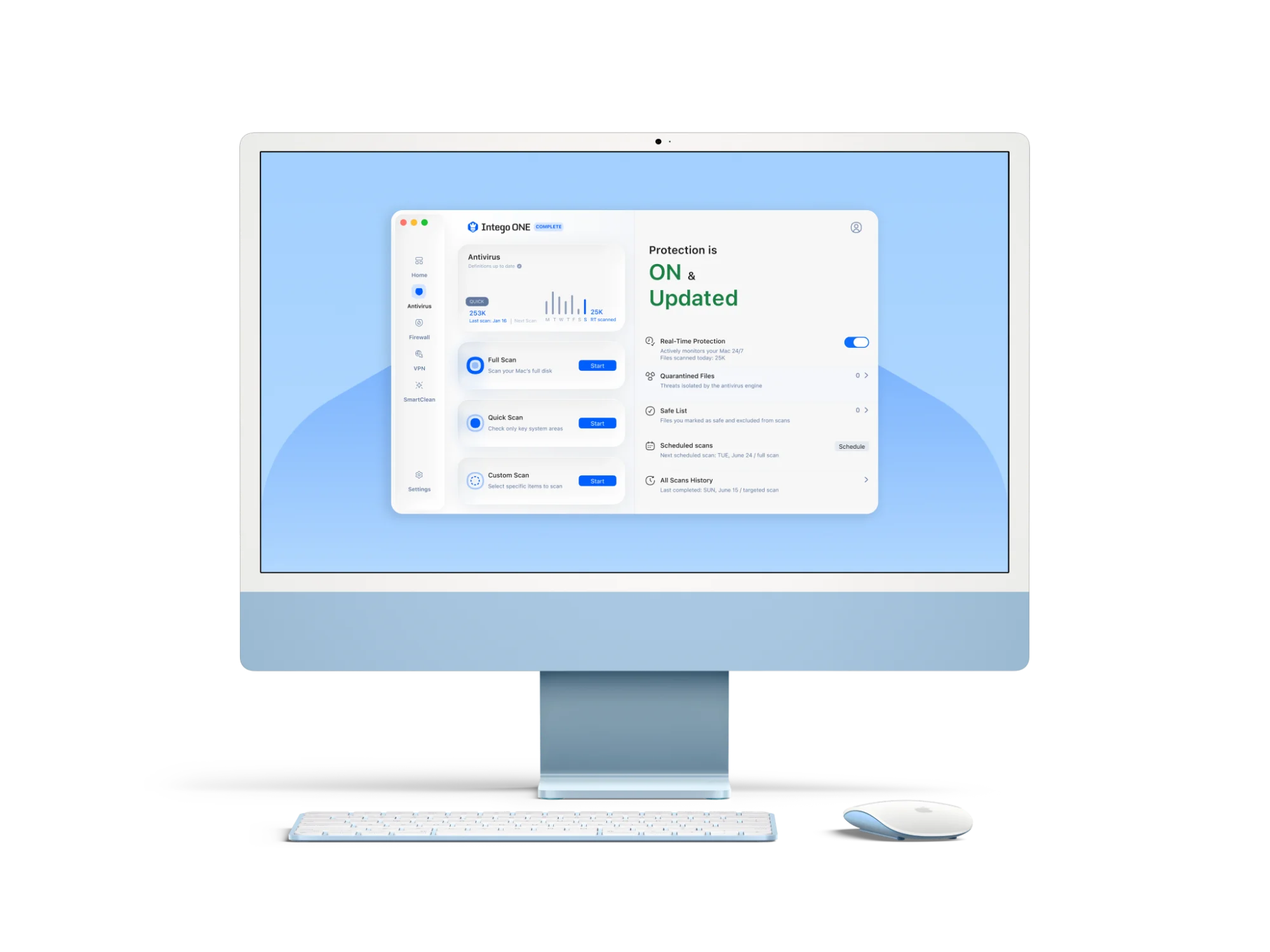
Apple’s built-in security mostly works automatically in the background. Intego ONE Antivirus complements it with a separate malware-detection system and controls you can use directly.
Independent testing also provides evidence of how the software performs. In March 2026, AV-TEST awarded Intego ONE 18 out of 18 points, with full scores for protection, performance, and usability on macOS Tahoe.
Real-time protection monitors files in the background and can block those identified as malicious.
Different scans let you choose what to check: A Quick scan checks the areas most likely to contain threats, while a Full scan examines the entire Mac. A Custom scan lets you select specific files, folders, or connected drives.

Scheduled scans run at suitable times: You can arrange regular checks for times when you aren’t using your Mac heavily.
Quarantine keeps suspicious files separate: If Intego ONE detects a potential threat, it moves the file to quarantine. You can then review its details and choose whether to remove or restore it.

Scan history shows what has happened: You can review previous scans, their results, and any threats that were found.
The firewall adds separate network controls: The Essential plan includes antivirus and firewall tools. Antivirus checks files for malware, while the firewall lets you monitor and control network connections. The Advanced plan adds SmartClean, while the Complete plan also includes VPN.
Choose protection that matches how you use your Mac
macOS provides meaningful automatic protection against many recognized threats, but no security system can catch every danger or prevent every unsafe decision.
Consider your exposure to unfamiliar files, the possible consequences of an infection, and the level of oversight you prefer. Dedicated antivirus can provide more of that control when you need it. Whichever option you choose, combine suitable security tools with careful everyday habits.
Frequently asked questions
Does macOS have built-in antivirus?
Yes. macOS includes XProtect, Apple’s built-in antivirus technology, which automatically detects, blocks, and can remove malware. It works alongside Gatekeeper and notarization to check downloaded software and prevent malware from running.
Does Apple recommend antivirus for Mac?
Apple doesn’t publish a blanket recommendation that every Mac user should install third-party antivirus. Instead, Apple’s guidance focuses on using macOS’s built-in protections, keeping software updated, downloading apps from reliable sources, and taking security warnings seriously. Adding dedicated antivirus is an individual choice based on how you use your Mac and how much additional monitoring and control you want.
Does a MacBook Neo need antivirus?
A MacBook Neo includes the same built-in macOS protections as other supported Macs. Its A18 Pro chip doesn’t change the basic decision: dedicated antivirus may be worthwhile if you download unfamiliar files, share your Mac, or want more control over scans and detected threats.
Can antivirus slow down a Mac?
Yes. Antivirus uses some processing power and memory, so it can temporarily slow down a Mac, especially during a full scan. Scheduling scans for quieter times and avoiding multiple real-time antivirus programs can reduce the impact.
Can I use more than one antivirus program on a Mac?
You can install more than one antivirus program, but you shouldn’t run two real-time antivirus products at the same time. They may interfere with each other, slow down your Mac, or produce conflicting alerts. If you want a second opinion, use a compatible on-demand scanner that runs only when you start it.
Is free antivirus enough for a Mac?
Free antivirus may be enough for basic scans, but features vary. Some lack real-time monitoring, scheduled scans, or support. Choose a reputable, regularly updated product that supports your macOS version.