Get Your Kids to Call Back with Family Protector’s Call Me Action
Posted on
by
Derek Erwin

Tired of your children ignoring your calls? Sometimes kids need a little more than a missed call or text to call you back.
Family Protector includes a Call Me action that allows you to freeze your children’s devices remotely, and then unlock once they call back.
Call Me sends a message with your number to your child and locks the device. This action turns off web browsers, all App Store installed apps, and the camera.
https://youtu.be/UI06I0s0CJw
Here’s how to use this feature to get your children to call back:
- In the Family Protector Web Admin, go to the Actions section.
- Choose the Call Me action, and then tap the button next to the children you want to be included in this action.
- If you want to freeze the device until your children call back, leave the Freeze Device? option enabled. You can disable this option by sliding the switch to the “Off” position.
- Tap the Phone Number option to enter the number you want the child to call.
- Tap the Message option to enter a quick message to be displayed in the alert that will appear on your child’s device device when the Call Me action is sent.
- When ready, tap Send in the top right corner of the screen.
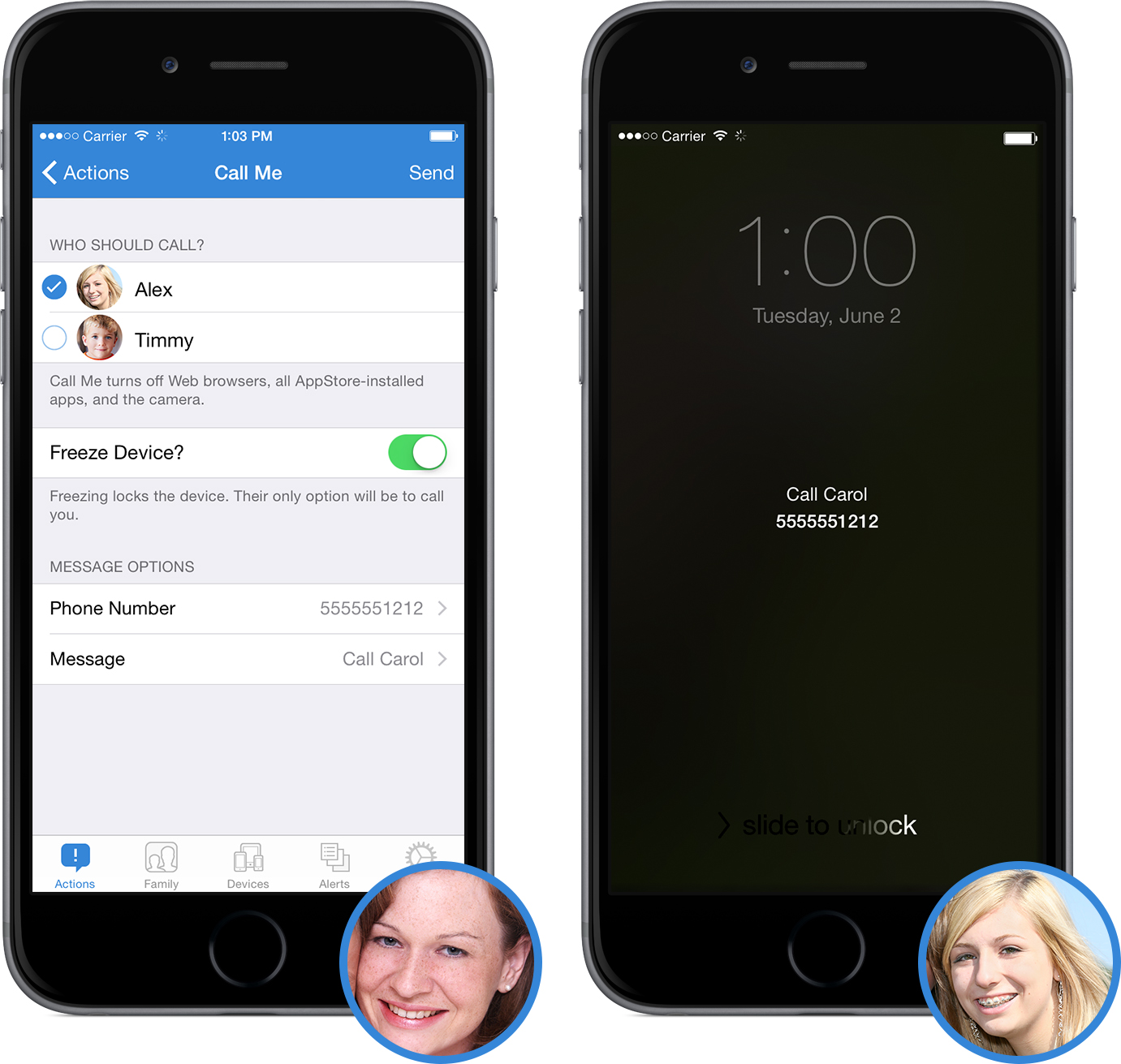
In the Actions section, you will see a confirmation message indicating it has been delivered. The name of each child that the action has been sent to will be listed.
No more ignored calls or texts — try Family Protector, and get your kids to call you back!