Browse more securely from dozens of VPN server locations worldwide
Connect to a VPN server and your traffic is automatically
encrypted for more privacy, all from the Intego ONE app.

 Apple Apple | Notarized |
|---|---|
4.8  | Excellent on Trustpilot |
| Mac-First | Since 1997 |
| 30+ Million | Devices Protected |
Intego VPN server locations
Intego VPN gives your Mac server locations across the Americas, Europe, Asia, the Middle East, and Africa. Connect to any of them to encrypt your traffic and browse from a different IP address.
- ArgentinaVirtual location
- Brazil
- CanadaToronto
- Chile
- Mexico
- United StatesSan Francisco
- United StatesDallas
- United StatesMiami
- United StatesNew York
- Austria
- Belgium
- Bulgaria
- Croatia
- Czech Republic
- Denmark
- Finland
- FranceParis
- GermanyFrankfurt
- Greece
- Hungary
- Ireland
- ItalyNaples
- NetherlandsThe Hague
- Norway
- Poland
- Portugal
- Romania
- Serbia
- Slovakia
- SpainMadrid
- Sweden
- Switzerland
- United KingdomEast London
- BangladeshVirtual location
- Hong Kong
- IndonesiaVirtual location
- Israel
- JapanTokyo
- KazakhstanVirtual location
- MalaysiaVirtual location
- PhilippinesVirtual location
- SingaporeCBD
- South Korea
- ThailandVirtual location
- TurkeyVirtual location
- United Arab Emirates
- VietnamVirtual location
- EgyptVirtual location
- KenyaVirtual location
- South Africa
How to choose the best VPN server location
The best VPN server depends on what you're doing. A nearby server suits everyday browsing, while another region suits location-specific needs.

For everyday speed
Choose a VPN server close to your real location. A server nearby shortens the distance your traffic travels, so browsing, streaming, and video calls stay quick and responsive.

For location-specific browsing
Select a server in another country, and websites and online services see that location instead of your real one. This is useful when you're traveling and want familiar regional content and accounts to load as usual.

For privacy on shared networks
Connect to any server to encrypt your traffic and mask your real IP address. This matters most on Wi-Fi you don't control, like airports, hotels, cafés, and coworking spaces, where the network may otherwise be able to see your activity.
What does a VPN server do?
A VPN server sits between your Mac and the rest of the internet. When you
connect to one, the traffic between your Mac and that server travels through
an encrypted connection, so the network you're on can't read it.
The VPN server also routes your connection through its own IP address.
Websites and online services then see the server's location instead of yours,
which helps keep your real IP address private.

How to connect to an Intego VPN server

01
Open Intego ONE
Launch the app on your Mac and open the VPN dashboard

02
Choose a server location
Pick the country or city you want, then connect

03
Browse with VPN on
Your traffic runs through an encrypted connection
Intego VPN is part of Intego ONE Complete
A VPN protects your internet connection, but it doesn’t scan your Mac for malware, manage suspicious network activity, or clear out files you no longer need. Intego ONE’s Complete plan gives Mac users more than just a VPN. It brings your Mac's security, privacy, and performance together in one app.
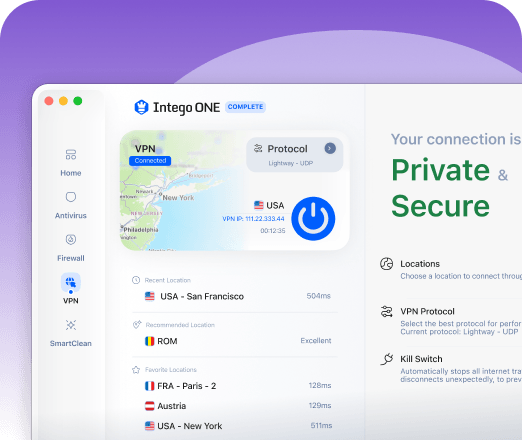
VPN privacy
Connect on networks you don’t control, and what you send stays private from them. Intego VPN encrypts your traffic and masks your IP address.
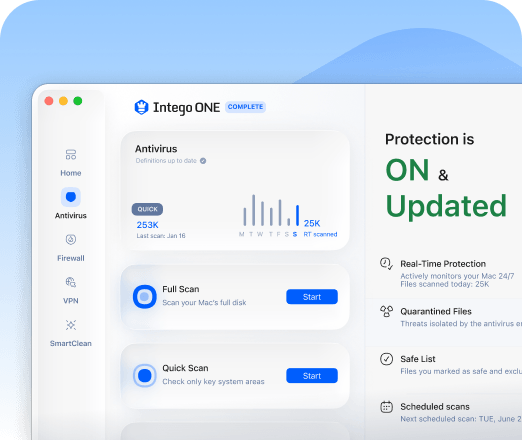
Antivirus protection
Stop Mac malware before it reaches your system. Intego scans for viruses, ransomware, spyware, and suspicious files on the way in.
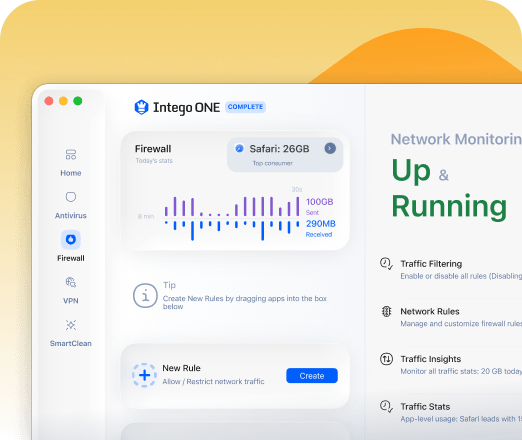
Firewall
Stay aware of what your Mac connects to. The firewall shows which apps are going online and lets you decide what to allow.
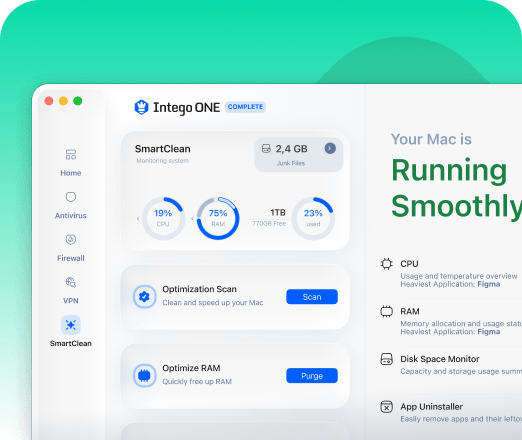
SmartClean performance tools
Keep your Mac free from clutter. SmartClean removes unnecessary files and boosts your Mac’s performance.
Why Mac users choose Intego ONE
Intego VPN is built for Mac users who want online privacy alongside protection for everything else their Mac does.

Independently tested and certified
Intego's Mac security is tested by AV-TEST and AV-Comparatives, two independent labs that evaluate antivirus protection. It earned top marks in AV-TEST's recent macOS evaluation and holds AV-Comparatives' Approved certification.

Built for Mac
Intego has focused on Apple devices for more than 25 years. Its privacy and security features are designed around how Mac users actually work, not adapted from Windows.

One app, not three
Your VPN sits alongside the rest of your Mac's protection in Intego ONE, so there's only one app to install, update, and rely on.
What Our Most Satisfied Customers Say
{"trustpilotBtnText":"Testimonials","techReviewsBtnText":"Reviews","hideCarousel":false,"selectedType":"testimonials","legalText":"We sometimes pay review sites to refer customers to us."}Award-Winning Security for
Mac and PC

AV TEST

AV Comparatives

VB100

Gold Award Winner

TopTenReviews

Editors Choice
Having trouble connecting to a VPN server?
Our 30-day
money-back guarantee
Install Intego in minutes and run your first scan right away. If you are not completely satisfied, contact our support team within 30 days for a refund. No hassle, no long forms, and no hard feelings.
Intego VPN server FAQs

Protect your connection — and your Mac
Intego VPN helps keep your internet traffic private. Intego ONE Complete goes further,
so one app looks after your Mac's security, privacy, and performance.